Whilst I’ve sighted scripts that exist for the ability to programatically create routes in Azure route tables, I crafted one with a specific potential use case in mind which contains a couple of controls around checking things first. The script could be developed into a lot more but I was focusing on creating UDRs into a route table based on Az BGP Community info or a static CIDR list. My ultimate actual aim use case is the automatic removal of stale routes, I haven’t yet modified the script to basically remove routes that are no longer published and thus have been removed from a source. This would essentially be a synchronisation of the route table to an external source.
If there are workloads or function apps reliant on connectivity directly to the Azure backbone or other uses cases whereby you need to bypass an NVA for processing throughput issues for instance then those routes will need to be added (and updating any NSG if required) to the route table likely as Next Hop Type “Internet”. The next hop can be customised as desired to point to an NVA if desired.
The script I’ve put together can utilise the Get-AzBgpServiceCommunity to grab all the CIDR prefixes for instance from “AzureActiveDirectory” or a region such as “AzureAustraliaSoutheast” and then automatically inject those routes directly into a route table. Otherwise, it can simply read in a text file with a list of CIDR addresses.
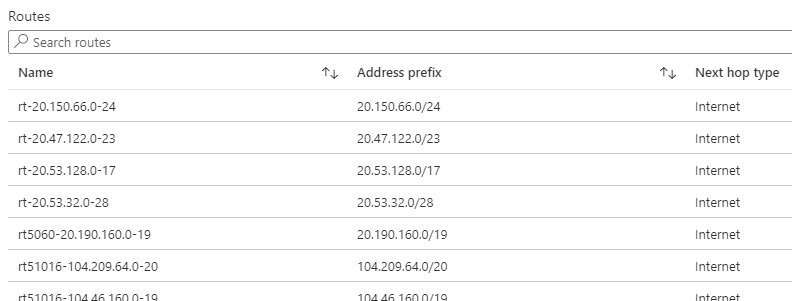
If the BGP fetch is used, then the script will formulate the route name to be “rt51016-104.209.64.0-20” for instance, otherwise the BGP Community number if omitted. You can see an easy example below of a couple of communities and some routes I injected from file.
There are a few sections where you can uncomment output detail lines and so forth. The script is set to use Azure BGP Community routes with “AzureActiveDirectory” left in the script by default.
- Fetch all details for desired BGP Community
- Fetch the actual BGP number details such as 12076:51016
- If the BGP prefix list is not empty, prepare the route name format, otherwise blank it.
- Fetch the desired route table content from Azure
- Extract the Address Prefixes specifically
- Foreach Cycle through the list;
- If route found already, set a flag
- If not found, add route to route table configuration variable
- Once the list has been cycled, commit the new routes to Azure.
Script located on Github at https://github.com/roity57/Azure-Gather-and-Compare-Info/blob/master/AzRouteTableUpdate.ps1
The script basically walks the existing route table to determine if the CIDR prefix already exists, this is slightly sped up by using the “break” command so the whole list is not wastefully walked through on every check cycle.
I had originally started assembling it as a function that could be called by supplying a single CIDR to the function at a time, but this turned out to execute extremely slowly taking around a second or more for each CIDR. The longest executing part is the actual “$rtable | Set-AzRouteTable | Out-Null” command at the very end.
