In order to validate a concept of geo-redundant deployment of some servers for remote access, partially following a CAF aligned Landing Zone deployment, I leveraged some Bicep Quickstart templates mixed with some PowerShell code in order to generate the environment automatically. The completed state is a DNS resolveable entry point via Traffic Manager to RDP to a server (you need to specify the desired unique name in the PowerShell code). The Servers are fronted via a private Load Balancer with all of this sitting behind an Azure Firewall (Standard SKU) and then DNAT rules against one of the two Public IP that are attached to the Firewall. Here’s a diagram!
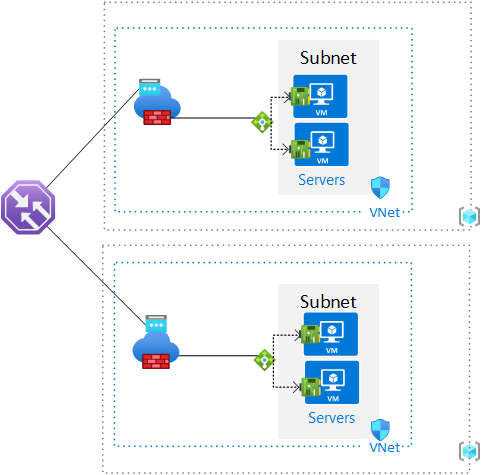
The two Bicep templates I leveraged are:
- Private LB: https://learn.microsoft.com/en-us/azure/load-balancer/quickstart-load-balancer-standard-internal-bicep?tabs=CLI
- FW & VMs: https://learn.microsoft.com/en-us/azure/firewall/quick-create-multiple-ip-bicep?tabs=CLI
I took content from the LB template and merged it into the FW & VM template and:
- Added lines to the “netInterface” resource so the VM NICs would related themselves to a backend pool for the LB.
- Altered the second DNAT rule to point to the internal IP of the LB.
- Defined a variable so that a hostname is assigned to public IPs, this is needed for the TM.
The PowerShell “script” is designed to create two resource groups in two separate regions and deploys the same bicep to each one. It then enumerates the second Public IP in each Resource Group in order to create a Traffic Manager profile with the two as endpoints. Be sure to specify a unique name for the “tmdns” variable in the script.
Inbound RDP access to the VMs in un-restricted, in a restricted scenario Firewall rules would be required to allow health probes from the Traffic Manager to reach the internal Load Balancers for the generally published IP address details of Azure Traffic Manager. The Firewall allows traffic out to getmywanip.com and whatsmyip.net.
If Service Tags can’t be used (https://learn.microsoft.com/en-us/azure/virtual-network/service-tags-overview#available-service-tags), refer to Microsoft for info regarding downloadable JSON files of IP address info: https://learn.microsoft.com/en-us/azure/virtual-network/service-tags-overview#discover-service-tags-by-using-downloadable-json-files with the specific page for Azure IP Ranges and Service Tags for Public Cloud at https://www.microsoft.com/en-us/download/details.aspx?id=56519
Always remember to teardown and delete the resource groups when finished testing, the standard SKU Firewall will run up dollars per hour. Tested with Az Module 9.4.0 on Windows 10
Link to Bicep and PowerShell: https://github.com/roity57/Azure-Deploy/tree/main/Geo-Redundant%20Servers%20TM